SPLoto.Net

Online application for lottery entries

SPLoto.Net supports the selection of numbers and predictions and the organization of entries through combinatorial and statistical analysis. It does not accept, register or sell lottery entries, or collect money to place bets. Users participate through the lotteries’ official channels.

The system can also work with a supporting Windows application to prepare entry lists and transfer entries to Loterias Online da Caixa, respecting the limits and rules of Caixa’s own service.

SPLoto.Net combines cloud processing, a modern interface and mathematical tools for anyone who needs a practical way to organize large volumes of combinations.

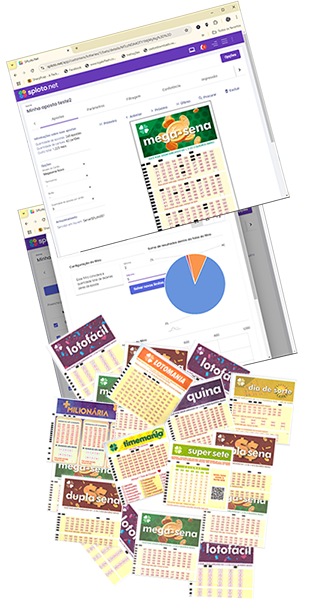
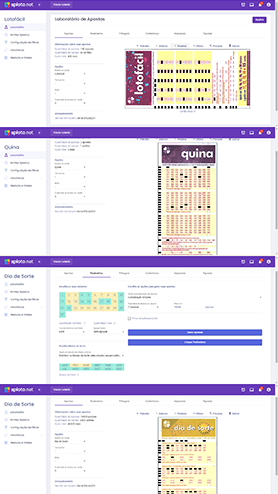
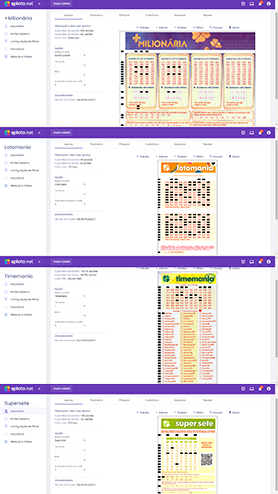
SPLoto.Net screens and lottery slips
Lottery systems Systems for Mega-Sena, Quina, Dupla Sena, Lotomania, Dia de Sorte, Timemania, Lotofácil, Lotogol and Loteca
Ready-made systems, computation and analysis in one workspace

Ready-made covering systems and custom computation

Choose a system from the library or define your own parameters to request a new covering system. Then work with numbers, filters, result checking and slips within the same study.

unique covering system configurations
2,870
completed solutions across computation methods
5,367

Number-system library checked on 11/3/2026. Compatible options vary by lottery.

Strategies library

Choose an already computed system

Compare systems compatible with your lottery by guarantee, match condition, selection size and budget.

  • Review the entry count and estimated cost before choosing.
  • Apply the system to the numbers you select.
  • Continue in the Laboratory and save the study to your account.
How to use Strategies
Covering system Laboratory

Compute coverage for your own setup

Define the number pool, entry size, condition and guarantee. The system can request computation of a covering system that is not yet in the library.

  • Configure fixed numbers, groups and study criteria.
  • Follow processing and the resulting entry count.
  • Use full combinations, random entries or covering systems.
Explore the Laboratory

The configuration and processing limits determine whether a computation is feasible. A solution found is not necessarily the smallest mathematically possible solution.

From analysis to slips, using your criteria

The modules work with your study. Review past draws, define criteria, generate, filter and check the entries before preparing output.

Configurable and custom filters

Even numbers, sums, sequences, rows, columns, borders, diagonals and comparisons with past draws, depending on the lottery.

Explore filters

Actual, simulated and historical checking

Check matches by draw, simulate results and analyze how entries would have performed in previous draws.

See checking in detail

Printing, exporting and pool reports

Organize slips, calibrate printing and prepare reports. Compatible Brazilian lotteries also support transfer to Caixa.

See printing and organization

Number and football lotteries

Explore the Brazil, United States and Portugal areas, with features and guides for each lottery published on this site.

Choose a country and lottery

Understanding SPLoto.Net covering systems

How many ready-made covering systems are in the SPLoto.Net library?

On 11/3/2026, the number-system library contained 2,870 unique V-K-M-T configurations and 5,367 completed solutions across computation methods. Different methods may solve the same configuration; those versions do not increase the unique configuration count. Strategies shows systems compatible with the selected lottery. These figures are a snapshot on the stated date.

What is the difference between Strategies and the Laboratory?

Strategies lets you choose covering systems already computed in the library. In the Laboratory, you define a study and can request custom coverage computation, including parameters without a ready-made solution in the library. Processing depends on the configuration and available limits.

What do V, K, M, T and the entry count mean?

V is the selected number count; K is the size of each entry; M is the match condition within the selection; T is the minimum coverage guarantee when that condition holds. The entry count is the size of the solution. Read Guarantee and Condition by their field names: other catalogues may order the letters differently.

Can I apply my own numbers to a ready-made system?

Yes. The system represents positions within a pool, and you choose the numbers for those positions before generating the entries. The Laboratory also lets you configure fixed numbers and groups, subject to the conditions of the study.

Does a coverage guarantee mean a guaranteed prize?

Coverage is a mathematical property conditional on matches within the selected pool. It does not predict the drawn numbers. Removing entries or filtering can compromise the original coverage; always review the final set.

Features vary by lottery. The guides explain the workflow and parameters for each one.

Features Premium

What can you do with SPLoto.Net?

The SPLoto.Net is an online platform for studying and preparing lottery entries, with tools for combinations, mathematical wheeling, covering systems, filters, statistical analysis, exporting entry lists, printing and checking results.

Choose a country to explore the lotteries supported by SPLoto.Net and access each lottery’s features and guides.

Brazil

10 lotteries

Features and guides in Portuguese.

SPLoto.Net gives you a robust tool for turning mathematical criteria into organized lottery slips, reports and result-checking lists.

Combinations and Covering Systems

SPLoto.Net offers three categories of combinations:

  • Full combinations: generate every possible combination of numbers within a selected set.
  • Covering systems: the system searches for coverage for the defined parameters and seeks to reduce the entry count. Choose a ready-made strategy or request custom computation in the Laboratory.
  • Random combinations: entries are generated completely at random within the set you define.

With SPLoto.Net, you can work on your entries from any computer or phone thanks to cloud processing. This removes the need to install the application on several devices and lets you use it without installation.

All your entries are stored in the cloud, but the system also offers the option of installing a supporting service on your computers. This can speed up combination processing when your internet connection is slower or when you want to make full use of a powerful machine.

Filtering

SPLoto.Net offers a wide range of predefined filters and lets you create and manage custom filters, so you can adapt the criteria to your needs. These filters help remove unwanted combinations and streamline entry selection, saving time and resources.

The available predefined filters include:

  • Even/Odd Numbers: Control the number of even or odd numbers on each slip.
  • Consecutive Numbers: Limit the number of consecutive numbers on each slip.
  • Sum of Numbers: Set a specific range for the sum of the chosen numbers.
  • Numbers in the Same Row/Column: Restrict how numbers are distributed across the slip.
  • Prime and Fibonacci Numbers: Filter combinations based on numbers with these mathematical properties.
  • Border and Diagonals: Include or exclude combinations of numbers in specific positions on the slip.
  • Similarity to Previous Draws: Exclude combinations that are too similar to past draws.

Custom filters offer even more flexibility, letting you create specific rules such as fixing certain numbers, grouping chosen numbers or blocking particular combinations. You can enable or disable these filters with a single click, making it easier to experiment and adjust your criteria.

Statistics

The SPLoto.Net offers comprehensive statistical analysis for all Caixa lotteries, with dynamic, colorful charts that make data easy and intuitive to view.

  • Number Frequency: Explore the most frequently drawn numbers and their combinations, including pairs, triples, groups of four, five and six.
  • Gaps Between Appearances: Identify numbers that have gone the longest without appearing.
  • Flexible Filters: See the effectiveness of applied filters and how they affect your combinations.
  • Dynamic Comparison: Compare statistical analyses across different draws and obtain indicators for your studies.

With SPLoto.Net, you can adjust your studies using organized, up-to-date data, clear reports and interactive charts that adapt to your needs.

Covering and Wheeling Systems

The SPLoto.Net combines a library of already computed strategies with algorithms for custom coverage computation. The Laboratory lets you request covering systems for configurations without a ready-made solution in the library, with processing progress and entry count control.

For those unfamiliar with the term, a lottery covering system is a technique that organizes subsets of numbers based on a matrix or coverage condition. Its purpose is to structure slips mathematically according to the rules selected for that study.

With SPLoto.Net, you can configure custom covering systems for lotteries such as Mega-Sena, Quina and Dupla Sena, defining your criteria in a practical way. The system lets your combinations follow the defined parameters, with a clear organization of the criteria used.

Cloud servers also make processing fast and accessible from anywhere, removing the need for high-performance hardware on your own device.


Always Up to Date

The SPLoto.Net is an online application that stays up to date, without downloads or manual updates. The system automatically synchronizes the latest Caixa lottery results as they are published, allowing immediate statistical analysis and strategies based on current data.

This also means that new features and improvements are integrated into the application automatically. Without worrying about installations or versions, you have continuous access to tools that improve the experience and expand the resources available for analysis and result checking.

With SPLoto.Net, you can keep moving forward with current tools for reports, dynamic charts and result checking, all in real time and with practical workflows.

Result Checking

The SPLoto.Net offers a complete result-checking solution, letting you check entries quickly and in detail. You can see the number of matches and identify exactly which slips reached each match tier.

Alongside standard result checking, the system includes advanced result checking, which enables retrospective analysis of all past draws. This is useful for studying patterns or testing strategies against historical data.

Another feature is the ability to create simulated results. This lets you test combinations and filters, exploring how entries would perform in hypothetical scenarios and helping you refine strategies before using the lists through official channels.

SPLoto.Net takes result checking beyond the basics, with smart, dynamic tools to better organize your analyses and decisions.

Printing and Export

The SPLoto.Net offers practical printing and export tools for your entries. You can configure the colors of cutting guides and choose whether to show them, avoiding problems with machines that mistake these lines for marks on the slips.

The application also includes a tool for exporting entries directly to the Loterias Online da Caixawebsite, removing the need to print. You can transfer entries to Caixa’s system in a practical way, respecting the limits set by the website.

Whether you print slips precisely or export to Caixa’s website, SPLoto.Net simplifies the process with a practical, modern workflow.

Lottery Pools

The SPLoto.Net makes lottery pools easier to organize, with options for preparing entries at different values, separating lists and recording the criteria used to build the slips.

The system also helps keep everything organized by generating complete entry lists. This makes pool management easier, with greater transparency and control over the conditions used to prepare entries.

All the recommended information is therefore available in a clear, professional format.

Pricing

Choose how you want to play

Complete access

Complete plan

All lotteries

  • Mega-Sena, Lotofácil, Quina, Loteca, Dia de Sorte, +Milionária and the other lotteries
  • Switch lotteries at any time without a new subscription
  • Combinations, covering systems, filters, statistics, result checking, printing and transferring entries to Caixa
Subscribe to all lotteries

Single lottery plan

One lottery

  • All SPLoto.Net features for the lottery you choose
  • Choose your lottery when you open the application
  • You can switch to the complete plan at any time
Subscribe to one lottery

How do I access the system?

Access the system directly on your computer or phone, without needing to install it.

Open app

At the top of this page, choose “Open application” on your computer or phone.

Registration

If you have not registered yet, choose registration to enter your details and gain access.

You are ready to explore

You can use the program for a week to explore its features. If you like the application, you can subscribe after the trial.

Open app
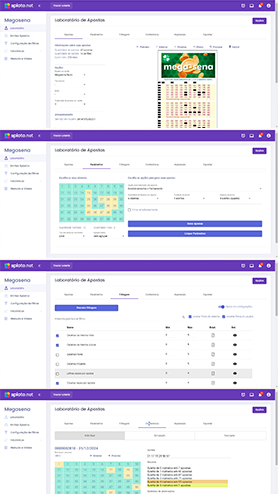
Interface SPLoto.Net

An online, visual and organized workspace

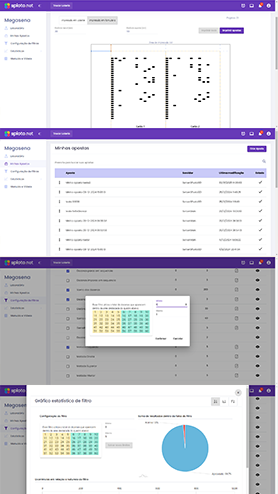
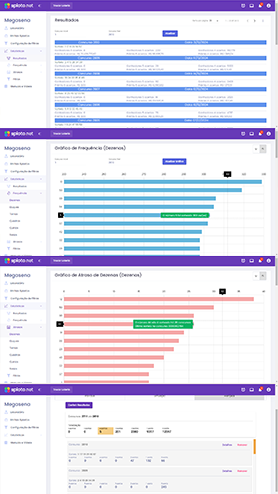
SPLoto.Net screens bring number analysis, filters, combinations and result checking together in one workflow, accessible through your browser.

An online interface for preparing, filtering, checking and organizing lottery entries.

SPLoto.Net home screen
SPLoto.Net filters and combinations
SPLoto.Net statistical reports
SPLoto.Net result checking
SPLoto.Net slip printing

Contact

Support is available through WhatsApp chat from 9 am to 5 pm (Brazil time).

WhatsApp chat support from 9 am to 5 pm (Brazil time).

Open WhatsApp

Follow SPLoto.Net news, tips and announcements on our WhatsApp channel.

Follow the channel